Tuesday, March 29, 2011

Linux Operating System

When you turn your computer on, you may not be aware of the large amount of communication going on inside of it. A lot of the communication that happens has to do with the operating system (OS) installed on the computer and the applications you might be running. The basis of an OS is software consisting of data and programs that is used to relay information between the hardware and applications. Any computer, including video game consoles and cellphones, uses some type of OS, whether it be Unix, Microsoft Windows, Mac OS X, and, our topic of today, Linux.

Linux first made its debut at the hands of Linus Torvalds in 1991, a then-21 year old Finnish student at the University of Helsinki. Torvalds wrote the Linux kernel so that it would be the first free and open source OS for computers, in contrast to the older Unix and MINIX operating systems. Unix and MINIX both restricted the use of their codes, limiting it only to academic institutions and businesses, with MINIX used more to teach students about OS than for its useful execution outside of the classroom.

The kernel of an operating system is the link between applications on the computer and the hardware, specifically the CPU, memory, and devices. The Linux kernel was first written in the programming language C, but it has been expanded to work with almost any other programming language, including C++, Java, PHP, Python, and Fortran. It is a monolithic kernel, which means that executes all the operating system code in the same address space to increase the performance of the system.

Linux is mostly used on servers, which is how Linux ended up running the 10 fastest supercomputers in the world, but its popularity on desktops has increased in recent years, possibly as a result of a 2007 "rebellion" in the Linux development community. As a result, many applications that used to run on only Windows or Mac OS have now been "translated" to Linux, including popular games such as World of Warcraft and Team Fortress 2, and more mundane applications such as Mozilla's FireFox internet browser.

However, if you're the kind of person who likes to look at code, the prospects for the Linux market are growing rapidly. The latest version of the Linux kernel is about 13 million lines of code, and with the ever-present advances in technology, the next one will be longer and more complex. Linux is definitely something to watch for and understand in the world of computing and technology.
Tuesday, March 15, 2011

The Switch to IPv6

Forget 2012, because it's 2011 that is the end of the IPv4 world in which we've all grown up. The Internet Assigned Numbers Authority, the organization which controls and coordinates global IP addressing for every computer on earth, is running out of IPv4 (stands for Internet Protocol version 4) addresses. As of February 2011, it was down to the last 2.7% of them.

So does this mean that new computers will become unusable? Of course not. The solution for this problem involves a little creativity, and a lot of new space.
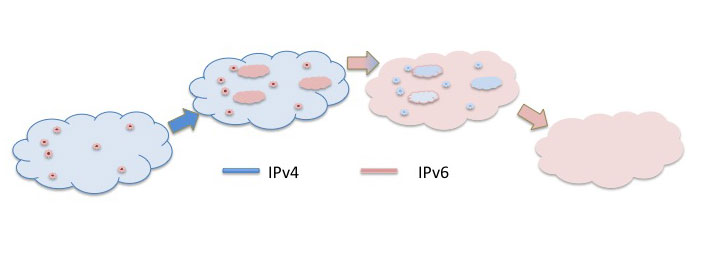
The gradual transition to IPv6. From http://www.potaroo.net/ispcol/2008-09/fig1.jpg
 To explain this better, imagine that all the IPv4 addresses are like the apartments in New York City. There's a limit to how many there are, and once they're filled, they stay there for good. Any technology device, including printers, has an IP address to tell other computers where to direct their information, similar to the mail service when you want to send a letter to a friend. Unlike people, however, the computers never change their addresses, and so this had led to the problem equivalent to overpopulation. So, instead of deleting computers from the system, computer scientists have been building New York City 2.0, which they have called IPv6.

IPv4 is a 32-bit internet layer protocol which handles the transfer of information through "routes," or pathways on the internet. Every piece of information shared online has three core data points that direct it: who sent it (IP address 1), where it's going (IP address 2), and how it's getting there (the route). This system was created in the 1980s, far before the internet got so huge, and long before anyone predicted it would run out. After all, it accounts for 2^32 addresses! Side note: remember that computers use a binary (base of 2) system to communicate.

IPv6, on the other hand, is a 128-bit internet layer protocol which can support 2^128 addresses, which is about equal to the impossibly large number 340 undecillion (3.4 x 10^38). This expansion allows for many more devices and users on the internet as well as extra flexibility in allocating addresses and efficiency for routing traffic. As of now, IPv6 is still in the pilot stage, but on June 8, 2011, this will change. Why? It's World IPv6 Day, of course!

On that day, the entire globe will be undergoing a test of the major IPv6 infrastructures. Many of the most commonly used websites (Facebook, Google, etc.) have or will enable a "gateway translation," which will allow IPv4 users to connect to IPv6. Unfortunately, .05% of people who are covered by IPv4 will experience major technical issues on this day. These are the problems that World IPv6 Day is trying to fix before the entire IPv6 is launched full-scale, which might happen in a decade or so.

So don't worry about losing internet access yet, unless you are part of the .05% group who has issues with the switch to IPv6. The point is that it's out there, and we're ready.

To all Johns Hopkins students, have a safe, restful, and fun Spring Break. The blog will return in 2 weeks. Until then, enjoy this small joy.

Wednesday, March 9, 2011

Cloud Computing Part 2: Applications

So a major question you should be asking right now is: Why are we so worked up about cloud computing now if it's been around and in use for a couple of years already? There are two answers to this question. 1) Microsoft has now become a cloud supplier, and since they've been doing a lot of advertising about it lately, the idea has finally reached the public's ears.

The second reason is far less fickle than the public's attention: The Obama Administration has asked agencies to cut the number of federal data centers by 40% in five years and identify 3 applications to move to a cloud in the next 18 months, one of which must be moved successfully in only 12.

This means that the U.S. Government will be on clouds (and servers) which could potentially be accessible by anyone. Obviously there's an issue with confidentiality, but ever since WikiLeaks went live, transparency in the Government is sky high. Now, they decided, is a good time to switch to cloud computing, and for a number of different reasons, one of which is cost effectiveness. Because cloud computing is mostly cheaper than owning multiple copies of the same software, the United States Government is cutting their technology budget, however marginally. This doesn't mean that taxes are going down anytime soon, but it does mean that the deficit won't be as large as it would have been without the cloud.

The question that the Government is now asking is which cloud provider will best meet their needs. The General Service Provider (GSA) is the odds-on favorite (mostly because it's also controlled by the Government) for most departments, but since each department is run individually, the choices will be varied. Some may choose public cloud providers such as Amazon or Salesforce, and some may even choose Microsoft.

The most technically-savvy of the departments will use their own cloud because they are equipped with the infrastructure and tech support to have it. For example, NASA's cloud, nicknamed Nebula, is an open-source cloud computing service specifically designed for NASA scientists and data processing. The Department of Energy (DOE) will be using its own Magellan program due to the specificity needed for their research problems, and the lack of this technology on public clouds.

Other, smaller municipalities are heading in this direction as well. New Mexico is looking to reduce IT and electricity costs with cloud computing, and in 2010 New York City made a deal with Microsoft for a single, citywide license under which the city will pay only for the applications that city employees actually use.

So the next time someone says you have your head in the clouds, retaliate by saying "That's where all the information is." You wouldn't be lying either.

Wednesday, March 2, 2011

Cloud Computing Part 1: Basics

To the cloud?

That's where everyone, from commercial users to large companies to the United States Government, seems to be going. Although the concept of cloud computing is relatively new, it has impacted the way we all think about data storage and program use, even if you have no idea what it is. You are not alone in this oblivion; until yesterday, this blogger had no idea what cloud computing was, but I knew I needed to find out.

This is precisely the reason that this week's article is about cloud computing: few people have a clear idea of what it is, but it's about to change everything about how we work with others.

http://tomlambert.com/cloud-computing-will-rule-the-world/
Cloud computing is best thought of as "pools" of computer resources and data storage in which each pool is run by an individual, major company, such as Google or Microsoft. The programs offered by the company will be accessible to every computer in the cloud, just as it is now on the internet or through software installation, but the best part is that you don't need to buy individuals resources and there are no compatibility issues. Essentially, the hardware itself becomes virtualized. Continuing with the pool analogy, it's more like renting a kick-board or flippers in the pool instead of buying your own. This greatly reduces the cost of operating large (and small) businesses, one of the benefits of cloud computing.

Yet another useful feature of the cloud is that any computer within the cloud can be accessed by another computer (hopefully with a password of sorts to prevent any kind of unauthorized access). Aware of the security breaches this kind of openness would cause for its users, the companies who create and maintain the clouds are extremely careful and sensitive to any kind of problem. While these systems seem prime targets for attack, companies recognize this and take extensive measures to prevent it from happening.Specialized teams at cloud headquarters act as highly observant lifeguards on the edges of the pool, ready to jump and save any piece of data that's in danger. In truth, even if a malicious person wanted to bring down the entire cloud cluster, there are so many nodes (sources of data) that it would take far too long for him to succeed.

One of the best parts of the cloud is the almost-endless data storage. While users pay for the ability to store data on a cloud, it's actually a better investment than having multiple back-up files on flash drives and external storage units. Even if you have multiple computers, the cloud will make it so that you have multiple machines, with their files and their programs, on the one computer you are using at that moment.

The layers of a cloud
To gain access to a cloud, first you need to purchase it from a vendor, which could be Microsoft's Azure, Google's App Engine, or any other one not mentioned here. It is a matter of best fit for you and what you need to be able to do on the cloud. Your computer, the client, is able to interact with the application on the cloud in the same way you, as a human, interact with your computer's normal (not cloud) programs. The platform works with the cloud's infrastructure, and controls the deployment of programs, minus the cost and extensive tech support. The infrastructure is the cloud itself, and it varies for each cloud's operating system, but the overall goal is to connect it to a massive server, which is where the data and programming is stored. These are maintained at buildings far away from where your computer is, so you don't have to worry about it at all.Although there are certain parts of each level which interact with each other, the majority of the information is trapped in one layer, minimizing the potential for security breaches and system downtime. The clouds are so effective that it is successful and operative 99.999% of the time (which means it's down for about 31 seconds every year).

Overall, the cloud seems to have so many benefits that even the Obama Administration has declared that the number of federal data centers will be cut by 40% in five years (about 420 of them in total), and that various agencies "identify applications to move to the cloud within 18 months," according to Government Computer News magazine. There will be more about this in next week's blog article. As for now, you've been inundated with enough cloud information.

Special thanks to Eric Caruso of Brown University for his help in explaining to me (in simple English) what a cloud is.

Tuesday, February 22, 2011

Future Projects for STS

If you've been an avid reader of this blog, you may have noticed that the last few entries have not been about JHU or STS. The reason for this is because the entire department has been working on an outside project which, after 20 months of solid work, is finally coming to a close. So here's a list of the projects that STS is planning to work on for the remainder of 2011:

  1. Modeling the Bloomberg School of Public Health: Like we did for the wildly successful Virtual JHU, STS would like to create a Google plug-in of the Bloomberg School of Public Health in downtown Baltimore. This project would likely take about 6 months, depending on the amount of hours the students are able to spend working on it, and assuming no other major projects are given to us.
  2. Reducing the size of the Virtual JHU program to make it faster and easier to load: pretty much what it sounds like. In technology, there's always room for improvement.
  3. Collegetown Shuttle Tracker: Have you ever used the Collegetown Shuttle? This project would take a 3D Flash PDF to show you where it is using a coordinated GPS tracking system. This would let students follow its path to know exactly where it is and where it makes its stops. This resource would be available for use by all students who use the Collegetown shuttle, including those at other schools. For security purposes we will require a log-in screen that will need a viable college ID to access the tracking page, but we feel that this will go far.
  4. Continuation of the STS TechBlog updates.
  5. Meeting the needs of those around campus who need our skills, such as:
    1. Creating fliers for official campus activities and meetings.
    2. Assisting students with technology problems.
    3. Writing technical manuals for new freshmen and transfer students.
  6. Updating our technology pages to make them more aesthetically pleasing. 
  7. Training new employees in STS tasks.
That's pretty much what we do here. If you would like to learn more, feel free to leave a comment.

Tuesday, February 15, 2011

Human vs. Computer: The Proof at Last

Although man created them, machines have always threatened humanity's superiority, and many movies, such as The Matrix and I, Robot, argue that they will eventually overtake us. After years of uncertainty, humans will now be able to discover if they can continue to develop increasingly sophisticated programs, or if they should enter into technological isolation. And it will be decided on television. From February 14th to 16th, the classic game show Jeopardy will have a new contestant: IBM's artificial intelligence program, nicknamed Watson after IBM's founder, Thomas J. Watson.

Watson is truly a feat of computer engineering, and regardless of whether or not it triumphs over its competitors, it should be appreciated as a historic piece of technological history. First, Watson analyzes the clue, taking into account any colloquial phrases or homo-phonetic hints. It then chooses its answer by running an enormous amount of algorithms at the same time, allowing each to come to an independent answer. The more algorithms that land on the same answer, the more likely it is that the answer is correct. The algorithmic results are then checked against a database. Watson is then able to rephrase his answers as questions, true to the game's format.

The database itself is absolutely huge. Watson's expanse of knowledge is stored on 90 IBM Power 750 servers with a total of 2880 POWER7 processor cores and 16 Terabytes of RAM (16x10^12 bytes). It is an expansion of IBM's long-term project of DeepQA, which is designed to handle hypothesis generation, massive evidence gathering, analysis, and, in this case, scoring. As can be imagined, Watson is a physically huge machine as well, and the "avatar" the public sees on television is only the front-end of a massive expanse of wires and humming, mechanical boxes on another floor.

Watson was first tested in 2006 by IBM's senior manager of Semantic Analysis and Integration department, Dr. David Ferrucci. At that time, it was only able to get about 15% of questions right, and it took much more than the 6-8 seconds the human competitors needed to think of the answer. To build up its knowledge, a team of 15 IBM staff members and faculty and students at eight different Universities fed it 200 million pages of documents, including plays, novels, dictionaries, encyclopedias, and even the Bible. By 2008, Watson's developers thought it was ready to challenge true Jeopardy contestants. That year, IBM contacted Jeopardy's producers, who agreed to have Watson on the show.

However, before Watson could be on the show, he had to train. By February 2010, it was consistently beating former Jeopardy contestants in mock competitions. On January 13, 2011 Watson beat his future competitors, Ken Jennings and Brad Rutter, in a practice round. Not one of the contestants, human or machine, answered a question wrong. The winner of the three days tournament will win $1 million, second will win $300,000, and third $200,000. Watson's winnings will be donated to charity, while Rutter and Jennings will each donate 50%.

So what's next for Watson after Jeopardy? IBM's researchers believe that Watson and the technology he represents has the power "to revolutionize many industries," including private banking, telephone operating systems, and medicine. Soon, it will be possible to diagnose diseases quickly and confidently, increasing the level of health care around the world. More data means smarter decisions, which means a better planet, they argue. There is no limit to the good Watson and his descendants can do.

Of course, if you're still worried about computers taking over the world, just remember: the documents Watson uses for his information all come from the minds and experiments of humans.

Tuesday, February 8, 2011

Top Careers in Technology

College is a time to expand outside of your main comfort zone, a time to explore your interests, and a time to explain to your parents why they should pay for you to get this particular degree. While majoring in something does not necessarily mean that you are going into that field directly (for example, physics majors are frequently hired by banking firms on Wall Street to run analyses), there is no question that majoring in a technological major will help you get a technological job. Here are some of the top careers in technology for 2011, some which are more obvious than others.

Biomedical Engineering: Biomedical engineers work alongside doctors to provide life-saving technology, such as artificial hearts, prosthetic limbs, diabetes meters and medication, and asthma inhalers. Thanks to the work of doctors and these scientists, people around the world can enjoy a higher quality of life, as well as a longer one. It just so happens that Johns Hopkins has one of the best BME programs in the world, so if you're not yet in college and interested in BME, check this out: http://www.bme.jhu.edu/academics/applications.htm

Computer Software Engineers: As you can imagine, computer software engineers write code for a variety of reasons: making iPhone apps, video games, and military applications, debugging programs already written, and launching new software.  Many of these engineers are finding work in Google and Facebook, which are constantly expanding and growing. Eventually, every field will need to know coding, but these guys blow them all out of the water.

Atmospheric Scientists: Speaking of water, if weather fascinates you, then consider a career as an atmospheric scientist, more commonly known as a meteorologist.  Some atmospheric scientists work at the Weather Channel, daily updating the public about weather, others study how to better predict the strength of hurricanes, and still others study odd weather patterns.Especially as global temperature begins to climb, climatologists are going to be in high demand, especially at the National Weather Service.

Civil Engineers: Civil engineers are able to leave their marks on society for years after they finish a project, so long as they build them right! They can work for the government or for a private company, which makes this one of the most versatile careers. Some even go overseas to build major projects in the Middle East, India, and China! Although some say that the job is stressful because of all the paperwork, the growth prospect is great.

Security Engineers: With more and more people using the Internet, the risk for identity theft is increasing. Security engineers write software that keeps your computer and files safe from hackers, manages interconnecting databases, and safeguards data transfers. They are constantly updating their systems to stay ahead of crime, and the job growth is projected at 15% over the next few years.

These are only five of the thousands of jobs that exist in a number of varied fields, and it's true that there are many jobs that will be available in 10 years that don't even exist now. If you remember to follow your passion, a career opportunity will present itself out of the major you choose.